20 coolest hidden Google tricks
1. Askew:

If you run a Google search for the word “askew”, you may think you’ve somehow broken your monitor or telepathically adjusted your display settings. But really, Google has just shifted a few degrees – the same thing happens if you search for “tilt”.
2. Goglogo:

Ever wanted your own personal version of Google, complete with a customised logo? No? Really? I suggest you move on to the next item. Otherwise, you can type “goglogo” into your Google search bar and hit “I’m feeling lucky” (if you’re having trouble with this, change your Google instant preferences or just type the word, then wait for the suggestions and hover over the first option — “I’m feeling lucky” will appear to the right). If you enter your name into Goglogo’s box, you’ll be rewarded with a search page that has been customised with your name.
3. Heart:

Could you plot this equation on a graph: “(sqrt(cos(x))*cos(200x)+sqrt(abs(x))-0.7)*(4-x*x)^0.01, sqrt(9-x^2), -sqrt(9-x^2) from -4.5 to 4.5”? No? Well, Google’s built-in graph function can compute all of that mathematical notation and stick the results firmly on the x and y axis to produce a little blue heart. Lovely.
4. The Google translate beat box:

If you type a string of garbled words into Google Translate, and ask it to translate them from English to German, then click the ‘listen’ icon, Google will start beat boxing. The text is “pv zk bschk pv zk pv bschk zk pv zk bschk pv zk pv bschk zk bschk pv bschk bschk kkkkkkkkkk”, but slightly different variations work too — and the beat box rhythm changes depending on how you combine the terms.
5. Google sphere:

Another experiment by the same team that brought you Google gravity, Google sphere transforms your Google Image search page into an interactive spinning orb. To access it, search for “google sphere” and click “I’m feeling lucky”. Then click on the search bar, and chase the swirling links around the screen to your heart’s content. The ‘sphere’ will spin around in different directions depending on where your mouse pointer is positioned on the screen.
6. The loneliest number:

In case you weren’t aware of this, Google’s built-in calculator will confirm it for you: the loneliest number is one. Aww, shame. It can also tell you how to calculate a blue moon.
7. Binary:

If you search for the word ‘binary’ in Google, you’ll get the results — but the exact number of results won’t be displayed in the form you’re accustomed to — instead, they’ll give it to you in binary code (that’s 1s and 0s for those of you who don’t speak geek). Something similar happens for ‘octal’ and ‘hexadecimal’.
8. Jet ski to China:

If you ask Google Maps for directions from Japan to China (I tried Tokyo to Shanghai), it will give you all the usual traffic routes… and an instruction to climb on board a jet ski to make it across the Pacific. If you try to go from Australia to America, Google will recommend taking a kayak. I’d rather walk to Mordor.
9. Gmail spam and trash:

If you’re a Gmail user and you aren’t suffering from a chronic case of ad blindness, you may have noticed something strange about the text adverts above your messages. Instead of the usual vaguely relevant ad, you’ll see a recipe for some spam dish in your spam folder, and a recycling tip in your trash folder.
10. Barrel roll:

Endlessly entertaining, this one trended worldwide on Twitter in November. Simply search “do a barrel roll” — if you have Google’s instant results functions enabled, your results page will be spinning before you’ve completed the instruction.
11. 42:

What is 42, you ask? Geez, it’s only the answer to life, the universe and everything. Ok, so if you’ve never read or watched The Hitchhiker’s Guide to the Galaxy, you won’t get this one. But Google’s built-in calculator will.
12. Gravity:

If, by any chance, you feeling like searching “Google gravity” and hitting “I’m feeling lucky”, don’t be surprised if Google comes crashing down around you the second you move the mouse. (Hint: you can disable Google’s instant results in your account preferences page to make sure you get the ‘I’m feeling lucky’ option).
14. Recursion:

Google pokes fun at its own “did you mean” suggestions if you search recursion (repetition or returning) by questioning your spelling even though you didn’t make a mistake.
15. Nagging Rams:

Similar to the ‘recursion’ response, if you search for ‘anagram’ (rearranging the letters in a word to make a new word or phrase, in case you didn’t know), Google rearranges the letters to suggest you were really searching for ‘nag a ram’.
16. Antarctic Penguins:

If you ever want to creep the Antarctic on Google Maps, you may be surprised to find the little orange peg man you drag and drop to change to Google Street View has transformed into a fat little penguin. Awwww.
17. Doodles:

What do you get if you don’t actually search for anything, and just hit ‘I’m feeling lucky’? A catalogue of all the Google doodles — all the way back to 1998. There were just three in that year — there have already been 69 in 2012.
18. Pacman:

It started out as a Google doodle to commemorate the 30th anniversary of Pacman in 2010, but the Google Pacman game was so popular, it was given a permanent home.
19. Zerg rush:
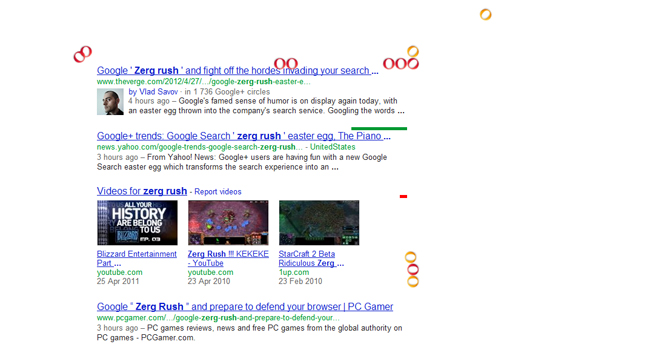
Google “zerg rush” and prepare to defend your browser against hordes of the letter ‘o’ in Google’s logo, which will start to destroy your search results. They’re apparently undefeatable, but you can try to fight them off by clicking on them and share your high score on Google +. For those who aren’t familiar with StarCraft, a ‘zerg rush’ is a tactic where swarms of aliens known as ‘zergs’ descend in multitudes in order to overwhelm their enemies.
20. Epic Google
This one gives a wider and bigger look of Google, but it doesn’t look exactly like how the real Google looks, as it’s using Google’s custom search if I’m right.
To View Google Epic: Type in ‘Epic Google‘ and click “I’m Feeling Lucky”.
